
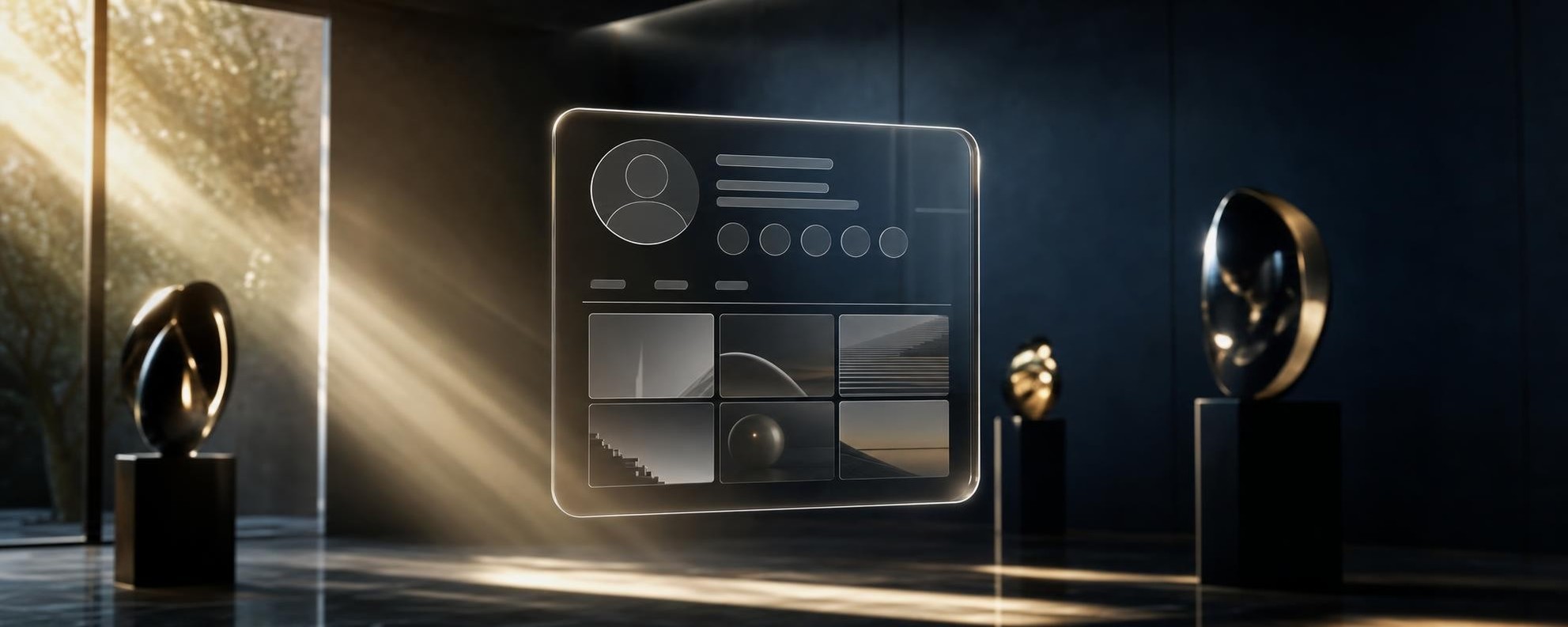
Imagine seu perfil do X flutuando dentro de uma sala 3D sofisticada, com esculturas, iluminação cinemática e materiais premium. Não é montagem no Photoshop. Não precisa de software 3D. E o resultado pode ser um vídeo animado de 10 segundos com qualidade de comercial.
Esse efeito viralizou no X depois que o @nett0eth compartilhou o processo completo, incluindo os prompts prontos para copiar e usar. A técnica combina geração de imagem por IA com animação pelo Google Flow, tudo de graça ou com créditos gratuitos.
O mais importante: a ideia não é copiar o cenário de ninguém. O ambiente deve ser criado a partir do seu banner, da sua marca ou de alguma imagem que represente a sua identidade. Cada resultado é único porque é construído a partir dos seus próprios elementos visuais.
Este guia explica o processo completo, do print do perfil ao vídeo final animado, com todos os prompts prontos para copiar.
O que você vai precisar
Antes de começar, prepare estes itens:
- Um print limpo do seu perfil do X. Abra seu perfil no navegador ou no app, tire um screenshot que mostre claramente o avatar, nome, arroba, bio e número de seguidores. Quanto mais legível, melhor o resultado.
- Seu banner ou uma imagem que represente sua identidade visual. Pode ser o banner do X, uma imagem com as cores da sua marca, um logo, ou qualquer referência visual que defina quem você é. Essa imagem vai definir as cores, objetos e estética do cenário 3D.
- Uma ferramenta de geração de imagem com IA. O processo funciona bem com o ChatGPT (versão com DALL-E) ou com o Nano Banana do Google Labs. Qualquer ferramenta que aceite envio de imagens de referência e gere imagens a partir de prompts detalhados serve.
- Google Flow (disponível em labs.google) com o modelo Gemini Omni. Você ganha 50 créditos grátis por dia, o que permite criar aproximadamente 3 vídeos de 10 segundos. Tudo em 16:9.
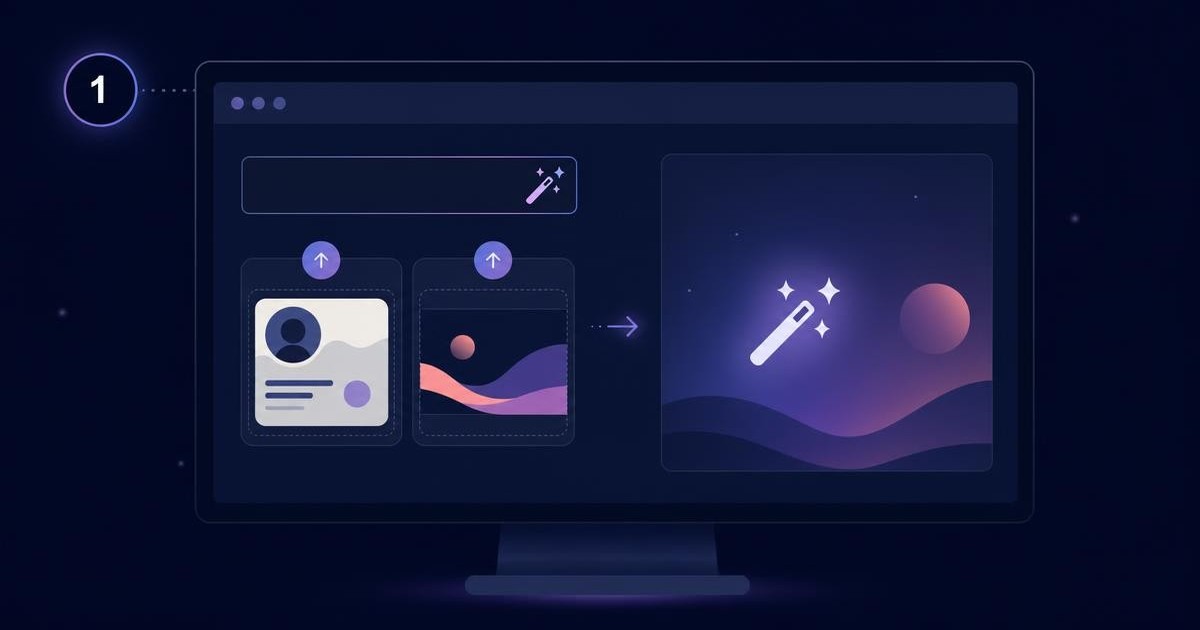
Passo 1: crie a imagem 3D do seu perfil
Abra o ChatGPT, o Nano Banana (labs.google) ou qualquer ferramenta de geração de imagem por IA que aceite múltiplas imagens como referência.
Envie duas imagens junto com o prompt:
- Imagem 1: o print do seu perfil do X.
- Imagem 2: seu banner ou referência visual (cores, marca, identidade).
Antes de enviar, substitua todas as informações entre [colchetes] no prompt abaixo pelas suas informações reais. Se os dados já estiverem legíveis no print, você também pode escrever [USAR O DADO DO PRINT] no campo correspondente.
Copie o prompt completo abaixo:
Use the two supplied reference images with strictly separate roles.

IMAGE 1 is the profile reference. Use it only to extract the avatar,
display name, handle, verification status, short bio, professional role,
follower count and interface language.

IMAGE 2 is the brand and environment reference. Use it only to define
the visual identity, colors, symbols, typography influences, artistic
motifs and decorative objects of the room. Do not reproduce it as a flat
background. Translate its most distinctive elements into an original
three-dimensional interior.

CUSTOM PROFILE INFORMATION:
Display name: "[DISPLAY NAME]"
Handle: "[@HANDLE]"
Verified badge: "[YES / NO]"
Short bio: "[SHORT BIO, MAXIMUM ONE SHORT LINE]"
Role or project: "[ROLE, COMPANY OR PROJECT]"
Follower count: "[FOLLOWER COUNT]"
Button label: "[FOLLOW BUTTON TEXT, FOR EXAMPLE: SEGUIR]"

OPTIONAL ART DIRECTION:
Room mood: "[BRIGHT, DARK, MINIMALIST, COLORFUL OR AUTOMATICALLY DERIVED FROM IMAGE 2]"
Primary colors: "[COLORS OR AUTOMATICALLY DERIVED FROM IMAGE 2]"
Important symbols or objects: "[OPTIONAL BRAND ELEMENTS]"

Create a cinematic 16:9 premium 3D interior resembling a contemporary
design gallery or carefully curated creative studio. The profile must
appear inside a large, elegant and compact floating glass card in the
central foreground. The card is the main subject and occupies
approximately 50% of the image width. It floats at eye level and may
partially overlap the elements behind it.

Redesign the profile as a refined glass interface rather than reproducing
the complete X interface. Keep only the most important information:
- Avatar
- Display name
- Verification badge, only if applicable
- Handle
- One short bio line
- Role or project
- Follower count
- Follow button

Remove menus, tabs, dates, following count, long descriptions and
secondary interface information.

The card must use smoked transparent glass, softly rounded corners, thin
illuminated edges, physically accurate reflections and subtle background
refraction. Keep the layout spacious, balanced and highly legible. Give
strong visual emphasis to the avatar and display name.

Render all supplied profile text exactly as written. Preserve spelling,
punctuation, capitalization, numbers, symbols and language. The
information supplied in the customization fields overrides conflicting
information found in the screenshot.

Build the surrounding room from the visual language of IMAGE 2. Select
three to five distinctive elements from the reference and reinterpret
them as premium physical objects:
- One main logo, word or symbol transformed into a wall sculpture
- One graphic element transformed into framed gallery artwork
- One abstract shape transformed into a glossy floor sculpture
- One or two decorative objects placed close to the camera to create depth
- A refined metallic X sculpture integrated naturally into the room

Do not copy the composition of IMAGE 2 literally. Use its colors, shapes
and brand identity to create a new environment that feels unique to this
profile.

Use a dark or brand-colored architectural wall, a pale or neutral floor
and strong but elegant cinematic illumination. Warm directional sunlight
enters through an off-screen or partially visible window, creating soft
volumetric light, long shadows and beautiful highlights on the glass card.

Include foreground, middle-ground and background layers to create strong
three-dimensional depth. Some foreground sculptures may be partially
cropped by the frame.

Keep the scene clean, spacious and visually controlled.

Professional CGI product visualization, realistic materials, high-end art
direction, physically plausible glass, polished metal, soft global
illumination, cinematic depth of field, 35mm lens, premium editorial
advertising quality.

Preserve the avatar faithfully. Do not change the character, face,
expression, clothing, colors or illustration style.

No additional people, hands, duplicated objects, random prisms, unrelated
logos, invented interface elements, unreadable text, excessive particles,
cyberpunk neon, heavy fog, exaggerated lens flare, geometry distortion,
warped typography or watermark.

The final image must be a clean 16:9 landscape composition suitable to be
used as the exact first frame of a cinematic video.
Passo 2: revise a imagem gerada
Depois que a IA gerar a imagem, confira cuidadosamente os seguintes elementos:
- Nome e arroba: estão escritos corretamente?
- Número de seguidores: aparece o número correto?
- Avatar: foi preservado fielmente, sem distorções?
- Botão de seguir: mostra o texto correto no idioma certo?
- Logo ou símbolo principal: aparece de forma reconhecível no cenário?
- Proporção 16:9: a imagem está no formato paisagem correto?
Se algum texto estiver errado na imagem gerada, não gere tudo de novo. Selecione a imagem e envie o seguinte prompt de correção:
Change only the incorrect text "[INCORRECT TEXT]" to "[CORRECT TEXT]".
Keep the avatar, glass card, room, objects, lighting, composition, colors
and every other detail exactly unchanged.
Substitua [INCORRECT TEXT] pelo texto errado que apareceu e [CORRECT TEXT] pelo texto correto. A IA vai tentar corrigir apenas aquele elemento, mantendo todo o resto intacto.
Repita esse processo até que todos os textos estejam corretos. Às vezes são necessárias 2 ou 3 correções.
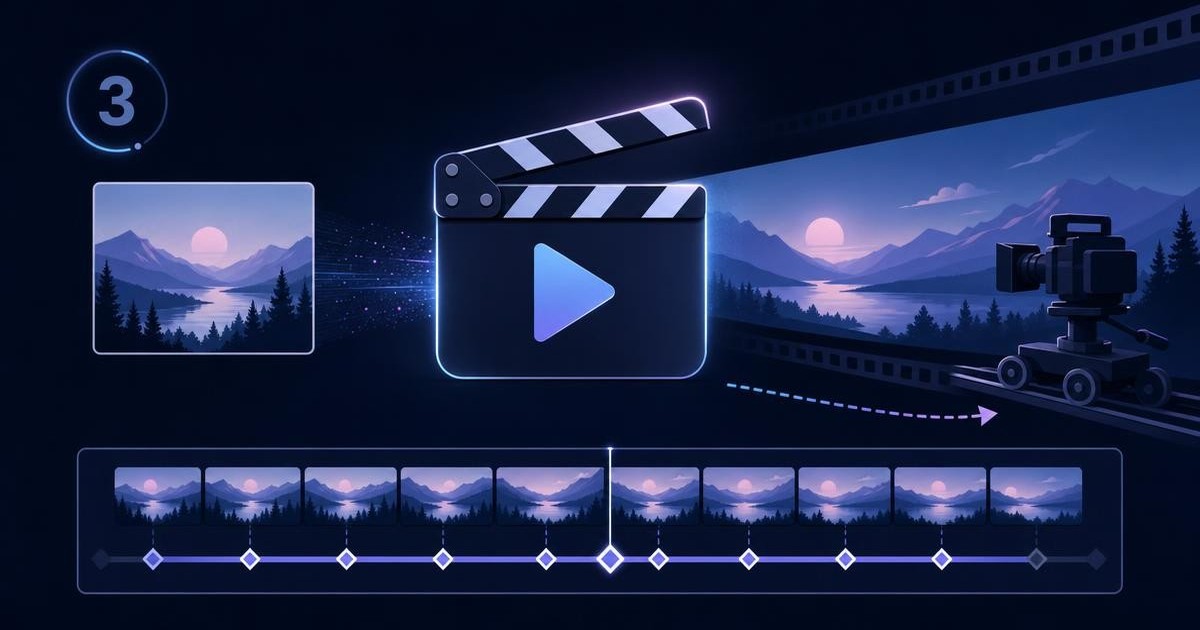
Passo 3: anime no Google Flow
Com a imagem final pronta e revisada, é hora de transformá-la em um vídeo cinemático de 10 segundos usando o Google Flow.
Siga estes passos:
- Acesse labs.google no navegador.
- Abra o Google Flow (anteriormente chamado de VideoFX).
- Crie um novo projeto.
- Selecione o modelo Gemini Omni.
- Escolha a opção Frames to Video ou a opção de usar uma imagem como primeiro frame.
- Envie somente a imagem final criada no passo anterior.
- Configure a proporção para 16:9.
- Configure a duração para 10 segundos.
- Cole o prompt abaixo.
Antes de colar, substitua [FOLLOW BUTTON TEXT] e [FOLLOWING BUTTON TEXT] pelo idioma usado no seu card. Por exemplo, se o botão mostra “Seguir”, use “Seguir” e “Seguindo”. Se mostra “Follow”, use “Follow” e “Following”.
Copie o prompt completo para o vídeo:
<FIRST_FRAME>

Use the supplied image as the exact first frame of a 10-second cinematic
video in 16:9 at 24 fps. Create one continuous shot with no cuts.
Preserve the original image's composition, profile identity, avatar,
visible text, card design, objects, logos, materials, colors, environment
and lighting direction exactly.

The large floating glass profile card remains the main subject throughout
the video.

[0.00-1.50s] Begin with the exact supplied composition. The glass profile
card performs an extremely subtle vertical floating movement of less than
1% of the frame height, with slow physical inertia. Warm directional
sunlight remains stable and creates delicate highlights across the glass,
metallic sculptures and architectural surfaces. All wall-mounted objects
and floor sculptures remain physically anchored. Objects that are already
suspended in the supplied image may rotate or drift almost imperceptibly
around their own axis.

[1.50-7.50s] Execute one slow, perfectly stabilized physical camera dolly
forward toward the floating profile card. This must be a real camera
movement through the room, not a digital zoom. Create physically accurate
parallax between the foreground, middle-ground and background. Objects
close to the camera move slightly faster across the frame, while wall art,
sculptures and architectural elements recede naturally in perspective.
Keep the horizon stable and the profile card rigid, centered, readable and
visually dominant. The card continues its restrained floating movement.
Preserve its transparent smoked-glass material, rounded geometry,
illuminated edges, reflections and refractions. Reflective or iridescent
objects already present in the first frame may create delicate
brand-colored reflections across the floor and along the outer edges of
the card. These reflections must remain subtle and must never cover the
avatar, profile information or follow button.

[7.50-8.70s] The camera gently decelerates and settles into a clean
medium close-up of the profile card. The avatar, display name, handle
and follow button become the strongest points of attention. Maintain
shallow cinematic depth of field while keeping all profile information
sharp and legible.

[8.70-9.30s] A single clean white cursor enters smoothly from the
lower-right edge of the frame and moves directly to the
"[FOLLOW BUTTON TEXT]" button. The cursor clicks exactly once. At the
moment of contact, the button compresses by approximately 3%, emits one
restrained glow using the profile's main brand color and immediately
returns to its original shape. The only permitted text change in the
entire video is the button label changing from "[FOLLOW BUTTON TEXT]" to
"[FOLLOWING BUTTON TEXT]". Do not modify any other text or interface
element.

[9.30-10.00s] Hold the final close-up composition. The button now
displays "[FOLLOWING BUTTON TEXT]". The glass card continues its almost
imperceptible floating motion while the room lighting and reflections
remain soft and stable. End on this composition with no cut and no fade.

CAMERA: Use only one slow forward dolly movement. No pan, tilt, orbit,
handheld drift, camera shake, automatic reframing, lens breathing,
sudden acceleration or digital zoom.

AUDIO: Use only restrained natural room ambience, faint distant exterior
sound entering through the window and one soft synchronized glass UI
click when the button is pressed. No dialogue, narration, music, beat,
rhythm, drones, pads, risers, swells or musical ending.

CONTINUITY: Preserve every readable word exactly as it appears in the
supplied first frame, except for the explicitly requested
follow-button change. Preserve the avatar, display name, handle,
verification badge, follower count, card proportions, background artwork,
brand symbols and official X logo exactly. Do not replace the X logo with
the old Twitter bird. Do not add people, hands, additional cursors, new
text, new logos, new objects, particles, smoke, decorative light trails
or interface elements. No avatar morphing, object duplication, melting,
geometry warping, scale drift, text flicker, texture crawling, reflection
instability, focus hunting or exposure pulsing. Do not redesign or
reinterpret the first frame. Animate the existing design only.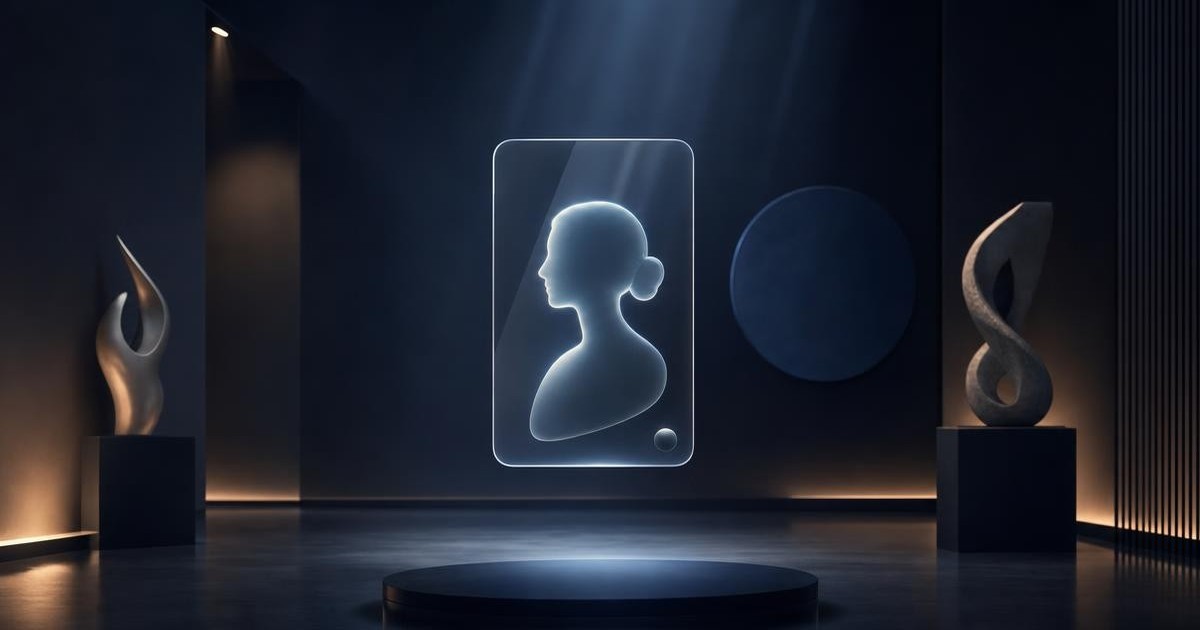
Exemplo real: meu perfil em 3D
Para mostrar como o resultado fica na prática, eu fiz o processo completo com o meu próprio perfil do X (@paulocoutinhox). O vídeo final ficou com qualidade de peça publicitária, com a câmera fazendo um dolly suave em direção ao card de vidro flutuante, até o momento em que o cursor aparece e clica no botão de seguir.
Você pode ver o resultado aqui: x.com/paulocoutinhox/status/2092360831895740677
O processo inteiro levou menos de 15 minutos, incluindo as correções de texto na imagem e a geração do vídeo no Google Flow.
Dicas para conseguir o melhor resultado
Depois de testar o processo e observar os resultados, algumas dicas fazem diferença:
- Use um banner com identidade visual forte. Quanto mais elementos visuais distintos o seu banner tiver, cores, formas, símbolos, tipografia, mais rica será a sala 3D gerada. Se o seu banner for muito simples ou genérico, o resultado pode ficar sem personalidade.
- Faça o print do perfil no modo desktop. O layout desktop mostra mais informações de forma legível. Evite prints do app mobile, que podem cortar ou comprimir elementos.
- Não pule a revisão. A IA às vezes erra textos, especialmente números e caracteres especiais. Uma revisão rápida antes de animar economiza créditos do Google Flow.
- Mantenha a imagem em 16:9. Essa proporção é essencial para o vídeo funcionar corretamente no Google Flow.
- Não use o cenário de outra pessoa como referência. O segredo é usar o seu próprio banner, suas cores e os elementos relacionados ao que você cria. Assim, o resultado mantém a mesma ideia de sala 3D com card flutuante, mas com a sua identidade.
- Administre seus créditos. O Google Flow oferece 50 créditos gratuitos por dia. Vídeos de 10 segundos consomem mais créditos, então você consegue gerar aproximadamente 3 vídeos por dia. Certifique-se de que a imagem está perfeita antes de gastar créditos com o vídeo.
Adaptações possíveis
O prompt é flexível e pode ser adaptado para diferentes usos:
- Outros perfis de redes sociais: o mesmo conceito funciona com perfis do LinkedIn, Instagram ou qualquer plataforma. Basta ajustar os campos do prompt para o formato da rede.
- Páginas de produto: em vez de um perfil pessoal, você pode colocar um card de produto flutuante em um cenário 3D da marca.
- Portfólio: designers, fotógrafos e criadores podem usar a técnica para mostrar trabalhos em um ambiente premium.
- Clima do cenário: no campo “Room mood” do prompt, você pode escolher entre bright, dark, minimalist, colorful ou deixar a IA derivar automaticamente da imagem de referência.
Como funciona o Google Flow
O Google Flow, anteriormente chamado de VideoFX, é um estúdio criativo de IA desenvolvido pelo Google Labs e DeepMind. Ele funciona como um ambiente de produção completo para gerar e refinar conteúdo multimídia, incluindo vídeos e imagens.
O modelo Gemini Omni é o cérebro do sistema. Ele permite edição conversacional, ajustes de iluminação, cenário e composição por meio de prompts de texto. Além disso, suporta entrada de imagens como primeiro frame, que é exatamente o recurso que usamos neste tutorial.
Pontos importantes sobre o Google Flow:
- Acesso: disponível pelo navegador em labs.google.
- Créditos gratuitos: 50 créditos por dia, suficientes para aproximadamente 3 vídeos de 10 segundos.
- Marca d'água: todo conteúdo gerado inclui a marca d'água digital SynthID do Google, que identifica o conteúdo como criado por IA.
- Controles avançados: oferece controle de câmera, consistência de personagem, construção de cena e edição multi-turn.
Resumo do processo
Para facilitar a consulta rápida, este é o fluxo completo em três passos:
- Passo 1: Tire o print do perfil + pegue seu banner. Abra o ChatGPT ou Nano Banana, envie as duas imagens junto com o prompt de geração de imagem. Substitua os campos entre colchetes. Gere a imagem em 16:9.
- Passo 2: Revise nome, arroba, seguidores, avatar, botão e logo. Se algo estiver errado, envie o prompt de correção sem regerar tudo.
- Passo 3: Abra o Google Flow em labs.google, selecione Gemini Omni, envie a imagem como primeiro frame, configure 16:9 e 10 segundos, cole o prompt de vídeo e gere.
O resultado é um vídeo cinemático profissional do seu perfil flutuando em um cenário 3D único, construído a partir da sua própria identidade visual. E o melhor: sem precisar de nenhum software de edição 3D, sem conhecimento técnico avançado, e com ferramentas gratuitas.
Crédito pelo prompt e pela técnica original: @nett0eth no X.